VMware ESXi: Virtualization Platform and Infrastructure Layout
The physical foundation of my on-premises lab is a compact HP EliteDesk system, but the real value of the platform comes from how I use VMware ESXi to turn that hardware into a small, multi-purpose infrastructure environment. This post focuses on the ESXi configuration and the virtual infrastructure running on top of the host.
This WordPress site runs on an Ubuntu virtual machine hosted on this ESXi environment, with the DigitalOcean server providing the public-facing reverse proxy and secure connectivity to the on-premises network
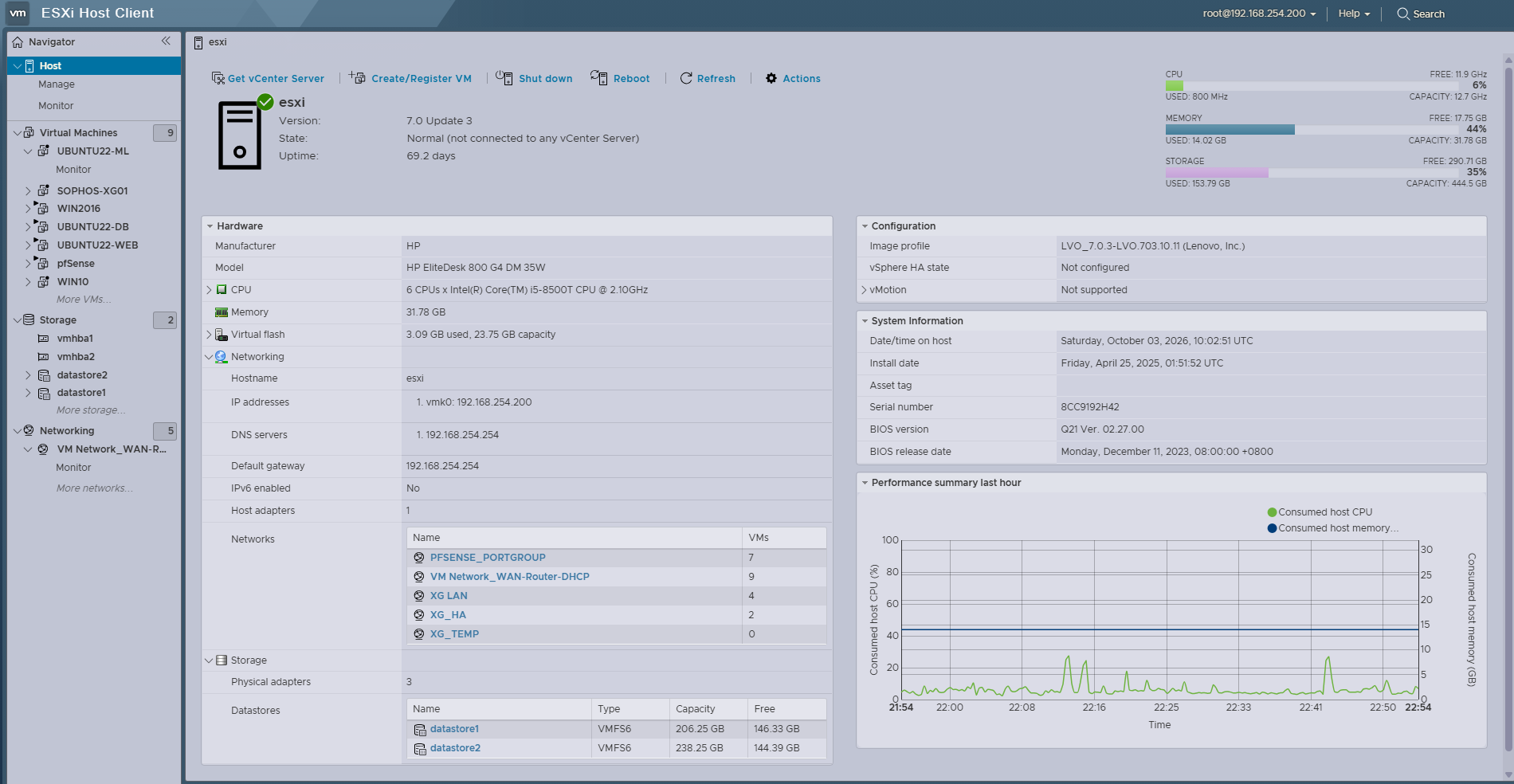
VMware ESXi 7.0 Update 3
The host runs VMware ESXi 7.0 Update 3 as a standalone hypervisor.
Virtual Machine Architecture
The ESXi host is used as a shared virtualization platform rather than being dedicated to a single application. The current environment contains several infrastructure and testing VMs, including:
| VM Role | Platform | Purpose |
|---|---|---|
| pfSense | FreeBSD-based | Firewall, routing and VPN integration |
| Windows Server | Windows Server 2016 | Active Directory, DNS and network services |
| Windows Client | Windows 10 | Endpoint and integration testing |
| Web Server | Ubuntu Linux | NGINX, PHP and web applications |
| Database Server | Ubuntu Linux | MySQL workloads |
| ML Server | Ubuntu Linux | Machine-learning and data workloads |
| Sophos Firewall | Sophos Firewall | Firewall/VPN interoperability testing |
| FreePBX | Debian Linux | Telephony experimentation |
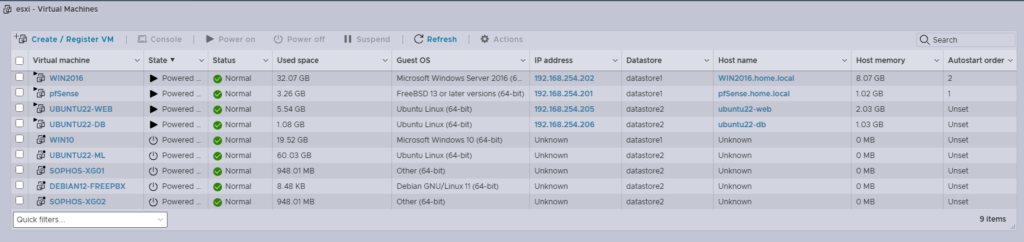
For a relatively small physical host, resource allocation is an important part of operating the lab. Not every VM needs to be running continuously, so workloads can be powered on or off according to what is currently being tested.
Storage Architecture
The host uses two VMFS datastores to separate workloads and storage requirements. The separation is useful for organizing the lab into different workload categories rather than placing every virtual disk into a single storage pool.
For example:
- Infrastructure workloads can be kept separate from experimental workloads.
- Larger application or testing VMs can be placed on the secondary datastore.
- VM storage consumption can be monitored independently.
- Storage capacity can be managed according to workload requirements.
Virtual Networking
One of the more useful aspects of this lab is the ability to reproduce a multi-network environment entirely within ESXi. The host currently has several logical networks/port groups, including:
ESXi
 │
 ├── WAN / Upstream Network
 │
 ├── pfSense Internal Network
 │      │
 │      ├── Windows infrastructure
 │      ├── Linux servers
 │      └── Client systems
 │
 ├── Sophos LAN
 │
 ├── Sophos HA Network
 │
 └── Sophos Temporary / Staging Network
This provides isolated Layer-2 segments that can be assigned to individual virtual machines. The result is that firewall and routing appliances can be tested against realistic network topologies without requiring a large physical switch infrastructure.
Virtualized Firewall Architecture
The ESXi host also allows firewalls to operate as virtual network appliances. For example, pfSense provides the primary routing and firewall functions for the internal laboratory environment.
A separate Sophos Firewall environment is used for security and interoperability testing. This creates an environment where I can experiment with:
- Routing
- Firewall policies
- NAT
- IPsec
- VPN interoperability
- Network segmentation
- High-availability concepts
- Firewall-to-firewall connectivity
- Troubleshooting asymmetric or incorrectly routed traffic
The important part is that the firewalls are not simply isolated demonstrations—they interact with the rest of the virtual infrastructure.
Infrastructure as a Test Environment
The ESXi host effectively provides a miniature enterprise-style environment. For example:
                         ESXi Host
                             │
              ┌──────────────┼──────────────┐
              │              │              │
           pfSense       Windows Server    Linux
              │              │              │
        Network Edge     AD / DNS / NPS    Web / DB
              │
        ┌─────┴─────┐
        │           │
    Windows      Security
     Client        Lab
                  │
             Sophos Firewall
This architecture makes it possible to test changes across multiple infrastructure layers.
A networking change can be evaluated against Windows and Linux workloads. A firewall change can be tested against VPN connectivity. A web application can be tested against a separate database server. Identity services can be tested from a dedicated client VM.
That interaction is where the lab becomes particularly useful for systems engineering practice.
Why Virtualize the Lab?
Virtualization gives me the ability to build and tear down infrastructure without changing the underlying physical environment.
Instead of needing separate physical systems, they can coexist on a single physical platform while maintaining logical separation:
- A firewall
- Windows Server
- Windows client
- Linux web server
- Database server
- Security appliance
- Development workloads
This also makes experimentation considerably less disruptive. A new VM, virtual network, or firewall configuration can be introduced without redesigning the physical network every time.
What This Demonstrates
The ESXi portion of the lab demonstrates practical experience with:
- VMware ESXi administration
- Virtual machine lifecycle management
- VMFS storage
- Virtual networking
- Network segmentation
- Virtualized firewalls
- Windows/Linux coexistence
- Resource allocation
- Infrastructure troubleshooting
- Multi-tier application environments
- Network security testing
More importantly, ESXi acts as the integration layer between many of the technologies used throughout the lab.
The physical host provides the compute platform, while the virtual infrastructure turns that platform into a flexible environment for experimenting with networking, security, operating systems, applications, and infrastructure engineering.