Cloud Infrastructure: Ubuntu, VPN, Routing & Secure Remote Access
The cloud component of my home lab is an Ubuntu Linux server hosted in DigitalOcean that provides the Internet-facing and connectivity layer for the on-premises environment.
This WordPress site runs on an Ubuntu VM within the on-premises ESXi environment, with this DigitalOcean server providing its public-facing reverse proxy and secure connectivity.
Rather than serving as a single-purpose server, it combines secure administration, VPN connectivity, routing, reverse proxying, TLS termination, and several self-hosted services.
In practical terms, this environment allows me to practice integrating enterprise applications and services across cloud and on-premises security boundaries. It implements patterns commonly found in Azure and AWS, including Application and VPN Gateways, reverse proxying, TLS termination, centralized authentication, and controlled access to private services. This provides hands-on experience building hybrid architectures using IPsec, RADIUS, certificates, Active Directory, Microsoft Entra, and network segmentation.
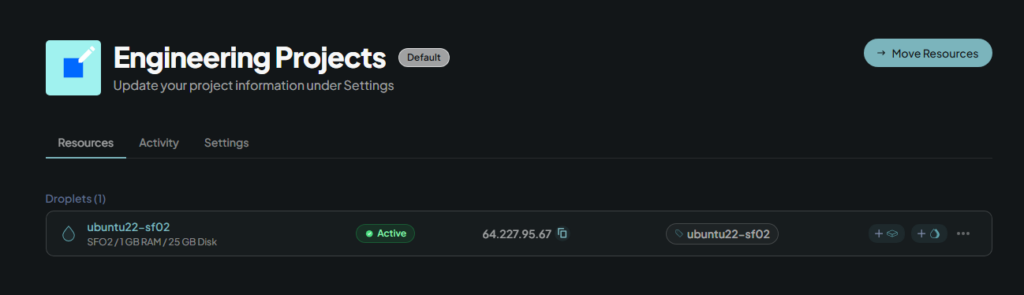
The primary roles include:
- Secure Linux administration
- Site-to-site and remote-access VPN
- Network routing and NAT
- RADIUS authentication
- NGINX reverse proxying and TLS termination
- Self-hosted web applications
- Integration with the on-premises infrastructure
Securing the Cloud Edge
The server is protected using multiple layers rather than relying on a single firewall. The DigitalOcean Cloud Firewall which sits inside a defined VPC restricts which services can reach the host from the Internet.
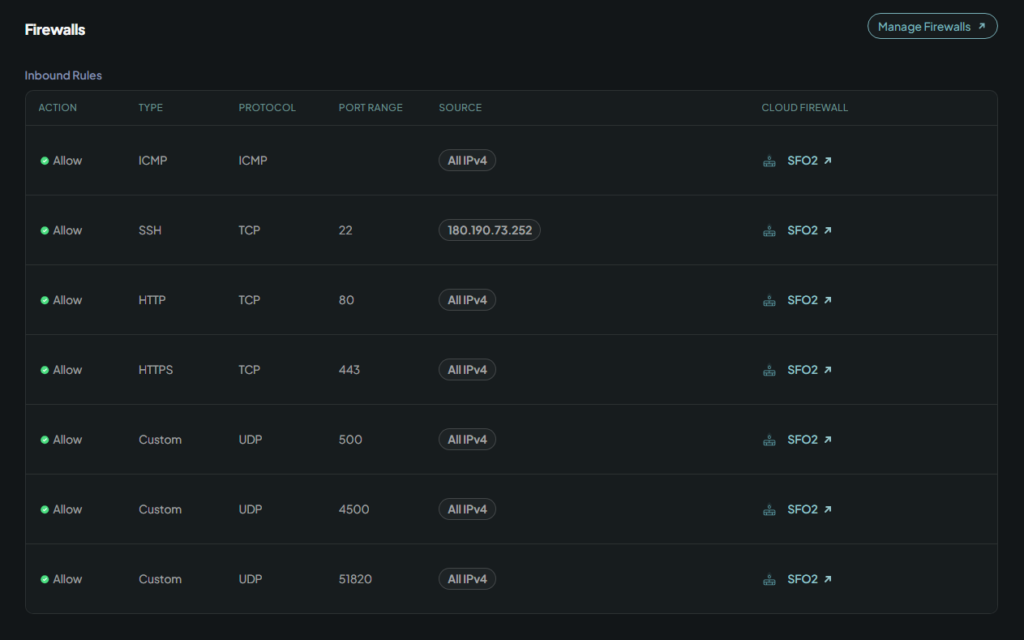
Administrative SSH access is further restricted by disabling password authentication and requiring public-key authentication:
pubkeyauthentication yes
passwordauthentication no
This provides a simple but important security boundary: Internet exposure is controlled at the cloud edge, while administrative authentication is handled cryptographically at the operating-system level.
Secure Connectivity & VPN Services
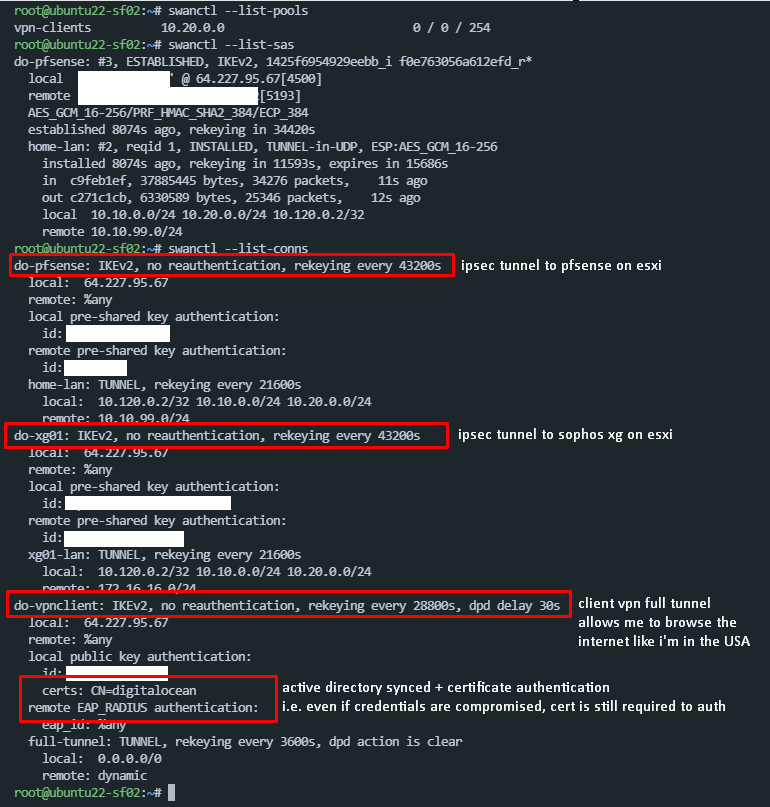
A major role of the cloud server is providing secure connectivity between remote clients, the cloud environment, and the on-premises lab. The environment uses StrongSwan/IPsec, IKEv2, WireGuard, and RADIUS, with each technology serving a different purpose.
Site-to-Site Connectivity
StrongSwan establishes encrypted IPsec tunnels between the cloud infrastructure and the on-premises firewall environments. This allows private laboratory networks to communicate with the cloud without exposing those networks directly to the Internet.
Remote Access
StrongSwan also provides IKEv2 remote-access VPN connectivity. Remote clients authenticate using certificates and EAP/RADIUS, and authorized clients can receive access to the laboratory networks and, where appropriate, full-tunnel Internet routing.
WireGuard
WireGuard provides an additional lightweight VPN option for trusted remote clients. The cloud server acts as the WireGuard gateway and routes authorized clients toward internal resources or Internet egress.
RADIUS & Identity
RADIUS provides the authentication integration layer for network access.
In the broader lab environment, RADIUS can integrate network services with Active Directory/NPS, allowing centralized identity to participate in VPN and network authentication rather than maintaining independent credentials on every service.
The result is a layered connectivity architecture:
                    Cloud Ubuntu
                         │
              ┌──────────┼──────────┐
              │          │          │
           IPsec       IKEv2     WireGuard
              │          │          │
              └──────────┼──────────┘
                         │
                  Private Networks
                         │
                  On-Premises Lab
                         │
              ┌──────────┴──────────┐
              │                     │
           pfSense               Sophos
              │                     │
        Core Infrastructure    Security Testing
StrongSwan’s connection and security-association status provides operational visibility into the active IPsec infrastructure.
NGINX Reverse Proxy & Web Services
The cloud server also acts as the public-facing web layer. NGINX handles:
- TLS termination
- Virtual hosts
- Reverse proxying
- Public web applications
- Routing requests to internal services
This allows selected applications to remain on private infrastructure while still being accessible through controlled public endpoints.
Internet
   │
   ▼
 HTTPS
   │
   ▼
 NGINX
   │
   ├── Local applications
   │
   └── Reverse proxy
           │
           ▼
      Private services
This creates a useful separation between the public application edge and the private application infrastructure.
Cloud ↔ On-Premises Integration
The cloud server effectively acts as the integration point between the Internet and the on-premises lab.
                         Internet
                            │
                            ▼
                  ┌──────────────────┐
                  │ DigitalOcean     │
                  │ Ubuntu Server    │
                  └────────┬─────────┘
                           │
             ┌─────────────┼─────────────┐
             │             │             │
            VPN          NGINX          SSH
             │             │
             │             └── Public Web
             │
             ▼
        On-Premises Lab
             │
       ┌─────┴─────┐
       │           │
    pfSense      Sophos
       │           │
   Core Lab    Security Lab
       │
   ┌───┼────┐
   │   │    │
 Windows Linux Applications
This architecture keeps the internal networks private while still allowing controlled access from the Internet and remote clients.
Infrastructure Services
| Area | Technology | Role |
|---|---|---|
| Cloud | DigitalOcean | Infrastructure hosting |
| OS | Ubuntu Linux | Server platform |
| Security | Cloud Firewall | Internet edge filtering |
| Administration | SSH public-key authentication | Secure management |
| Site-to-site VPN | StrongSwan / IPsec | Cloud ↔ on-premises connectivity |
| Remote VPN | IKEv2 | Remote client access |
| Lightweight VPN | WireGuard | Remote connectivity |
| Authentication | RADIUS | Centralized network authentication |
| Web | NGINX | TLS and reverse proxy |
| Application | PHP-FPM | Web application runtime |
| Services | FreshRSS | Self-hosted applications |
| Routing | Linux routing/NAT | Network integration |
| Automation | Git / shell / systemd | Infrastructure management |
What This Demonstrates
This server gives the lab a practical cloud-to-on-premises integration layer rather than treating cloud and local infrastructure as separate environments.
The project demonstrates hands-on work with:
- Linux server administration
- Cloud infrastructure
- Firewall configuration
- SSH hardening
- IPsec and IKEv2
- WireGuard
- RADIUS authentication
- Network routing and NAT
- NGINX
- TLS
- Reverse proxying
- PHP-FPM
- Self-hosted applications
- Cloud/on-premises integration
The interesting part isn’t any individual service. It’s the way they work together to create a secure hybrid infrastructure environment.